




How are you using video communications today? Enjoying video calls with loved ones across the country? Sharing video clips online with your friends? Collaborating with co-workers? No matter what you’re doing, Logitech wants you to look and sound great, so we’ve teamed with Skype™ to bring you the highest quality video calls possible with full-HD 1080p video.
Thanks to the Logitech HD Pro Webcam C920 it’s easier than ever to capture full-HD 1080p video so family, friends and co-workers can see and hear you with breathtaking quality.
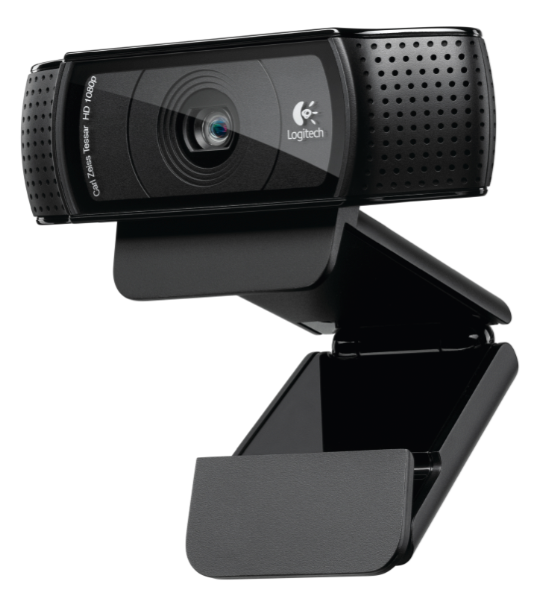
Our new webcam features Logitech Fluid Crystal™ Technology, Carl Zeiss optics and a premium 20-step autofocus. This means it delivers smoother video motion without annoying choppiness, and you get sharper pictures and richer colors so your loved ones will literally see more of you. And because being heard is just as important as being seen, two mics positioned on either side of the webcam capture natural stereo audio.
The Logitech HD Pro Webcam C920 captures full-HD 1080p video for connecting with friends via Skype or in HD 720p for Windows Live™ Messenger. Sharing your videos over social media is a snap thanks to the webcam’s H.264 advanced compression technology. You can upload full-HD 1080p video clips or 15MP photos quickly and with one click to Facebook, Twitter™ or YouTube™.
And, if you plan on video conferencing with colleagues – in the next office or halfway around the world – Logitech will also offer a similar webcam optimized for businesses. To learn more, visit www.logitech.com/business.
Once you have your own Webcam C920, download the latest version of Skype, Skype 5.7 Beta for Windows, and try out the 1080p for yourself.
Tell us – who are you most excited to video chat with?


Will this work with Panasonic’s tv’s ?
@Nico, The Logitech HD Pro Webcam C920 currently supports Windows 7, Visita, and XP.
You actually forgot to mention the ONE feature many “oldtime” QuickCam fans have been asking Logitech to bring back for a while – the ability to mount the webcam to a standard tripod! THANKS!
Also, I am liking the new shape for the mounting clip. As brilliant as the quality of my C910 is, setting it up is a bit tricky because it’s a tad “front heavy” and likes to tumble off my (not overly thin) screen if I accidentally bump into it. I am not the only one who has these issues, some Amazon reviews suggest the creative use of blu tack or weights to improve stability.
I’ll have a close look at the C920 (when can we expect it to hit the stores?) and if I like it well enough, I might upgrade and pass the C910 on to a friend who’d been eyeballing it already after seeing its image quality.
if the B990 is the business version of the c910, will the c920 have a business version as well?
also, is the 920 a bit smaller and/or lighter than the 910? i used the 910 on a laptop and it was a bit heavy/big for setting atop the lcd, tx
@GG, There are no plans at this time for a business version of the Logitech HD Pro Webcam C920. Logitech is now offering the C920 to its business customers through various enterprise sales channels.
Our company use only the snapshots function of this webcams. The features of C920 indicate that the camera can take still images up to 15Mpx with software enhanced, We need to know the real resolution of the lens without the interpolation.
Thanks!
Will the C920 work on a Panasonic TV for Skype?
@Ed, Currently, the Logitech HD Pro Webcam C920 works on WIndows 7, Vista, and XP.
“thanks to the webcam’s H.264 advanced compression technology” – it’s still unclear.
Does it mean that C920 has hardware H.264 encoder?
So is the biggest difference between the 20 and 10 USB 3? Is it true USB 3, meaning it supports the higher bandwidth or something else…
Also, will there be some sort of ‘upgrade’ option if I want to go from my 10 to the 20?
This is not advertised to be compatible with Mac OS X, but what specific features will or will not work on Mac ? The previous version C910 does work with Skype on Mac — can this one also be used (for 720p video) ?
Can this webcam save HD video 1080p directly to file? With other webcams, you first need to save the uncompressed video data (many GB’s), and then compress is to H.264. This takes a verry long time.
If it is possible to save the webcam output (H.264) without recompressing the data (so I can capture the data on a “slow” pc, like a Intel Atom), this is the webcam I am looking for!
See you have now posted my first question. Thanks, looking forward to the answer. If you can save the H.264 stream without straining the CPU, this cam will be VERRY interesting for recording in car-pc systems and home security systems (now using H.264 encoder cards, expensive for only 1 or 2 cams).
will it support mac osx is all i want to know? if so I’m sold.
@Brandon, We unfortunately can not comment on future product updates, but it currently only supports Windows 7, Vista, and XP.
When does the product actually ship?
so, how close can one be to the camera without it becoming blurry ?
The B920 is the business version of the C920 (as shown on the webcam lineup page on the business page), There IS a tripod mounting screw built into the C920. Yes there is a built in H264 encoding chipset on the B920/C920. No the B920/C920 will not work with non Windows PC devices. Mac support is unknown at this time. Currently it is available for sale on Logitech’s website (add to cart, instead of preorder like it was before) Currently only Skype 5.7 Beta and above for Windows will allow you to transmit 1080p video at 30fps, but I suspect sooner or later this ability will move over to the Mac side of things.
Will it support logitech revue. thx!
The Logitech HD Pro Webcam C920 is currently available on Windows 7, Vista, and XP. If you are interested in a webcam specifically for the Logitech Revue, check out our TV Cam
Will this work on WebEx?
@Henry, The Logitech HD Pro Webcam C920 will work on WebEx
Thanks to Mike Wolf – he answer on almost all questions, but about :
– what is the real optical resolution of C920 ?
– what is the shortest distance of clear autofocus ?
– Can this webcam save HD video 1080p directly to file? With other webcams, you first need to save the uncompressed video data (many GB’s), and then compress is to H.264. If you can save the H.264 stream without straining the CPU
– is the USB 3.0 ready, means that C920 supports the higher bandwidth, or it can be only plugged in USB 3.0 port, but work on USB 2.0 protocol ?
One more question :
– If there is a difference between C910 & C920 in number of steps of autofocus ( 20-step for C920 ) ?
@Shandr,
The optical resolution of the C920 is 3M and the Logitech HD Pro C920 Webcam can save 1080p HD video directly to file. In addition, a user can select the type of video quality from the preference window. Since USB 3.0 supports USB 2.0, the C920 is compatible.
Can we use this camera for processing?
what is the data format?
can we adjust the resolution of the camera?
How does the field of view of the C920 compare with the C910? I’m looking for a conference room webcam and the C910 isn’t sufficiently wide angle.
@John, Please visit our support forums for assistance.
Hi
I recently purchased the Logitech C920 HD Pro Webcam after reading some reviews online that it works on Smart TV. We have a Panasonic SMART TV, and we tried to connect it the TV, but it does not seem to work.
Need some help please?
Thanks
@Argyha, Currently, the Logitech TV Cam is one of our webcams supported specifically for smart TVs.
Is there a way to record video in “RAW” or “UNCOMPRESSED” modes?
1080P (raw or uncompressed) would need “USB 3.0”?
Is there any advantage of having a USB 3.0 port on your computer to use with the C920?
@Nunyer, We currently do not have any features that allow video recordings in raw or uncompressed modes. Regarding USB 3.0, we have made no specific alterations to pump more data through a 3.0 port than a 2.0 port
I have a tv panasonic VIERA, after read about c910 can work with it; I can’t read about c920 support it. Could you tell me if c910 can work or not? Please don’t respond that only can support windows version, i need an exact answer, try in your labs and after respond me. My tv model is: P50GT25
@Carlos, The Logitech HD Pro Webcam C910 is compatible with Windows 7, Vista, and XP and Mac OS 10.5 and higher. If you are interested in TV Cams, please check out the Logitech TV Cam.
Possible for 2 units of HD Pro Webcam C920 to be used at the same time ?
I’m planning to record some interviews, with 2 different angles, which may be edited at a later time.
@Albert, Recording with 2 Logitech HD Pro Webcams C920 on the same computer is currently unsupported using our software. We recommend researching 3rd party software regarding this set-up and configuration.
Why not support Mac?
@Aramis, Currently, the Logitech HD Pro Webcam C920 is only available on Windows 7, Vista, and XP and we unfortunately can not comment on product support for Mac at this time.