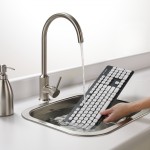
Four Tips to Keep Your Keyboard Clean
June 11, 2013 5 Comments on Four Tips to Keep Your Keyboard CleanWhen was the last time you cleaned your keyboard? For something most of us use (and eat over) every single





You are here: Home  Post Tagged with: "tips"
When was the last time you cleaned your keyboard? For something most of us use (and eat over) every single
Whether you spend five minutes or five hours using your keyboard or mouse, these recommendations can help you stay comfortable
Hi, my name is Ian Mazoff and I’m the technical content developer on Logitech’s Digital Home team. I make little
Looking to get the most out of the Netflix app on your Logitech Revue? Here are some tips to do
While Logitech Alert is great for recording video clips of motion-based events, did you know the system also allows you
The Logitech Revue with Google TV can connect to your existing home network via Wireless or Ethernet connections. For more
Google TV and smartphone lovers — we have an app for you! Control your Logitech Revue with Google TV experience
Google Queue on the Logitech Revue gathers everything you want to watch into one simple place. Check out the video
The Logitech Keyboard Controller was designed to easily navigate the Google Chrome browser on Google TV. Below is a list
Many people have been asking if you can enable “tap functionality” on the Logitech Keyboard Controller trackpad. And I’m happy