




Hi again everyone. I’m happy to be able to tell you (finally!) that the Harmony Adapter for PLAYSTATION 3 will be available in the next few weeks in North America, is coming any day to Australia, and will be available in Europe in July. Thanks for the many great comments and questions you posted in response to my March 20 blog post. Let me respond to some of them as succinctly as possible…
How much?
$59.99 suggested retail price
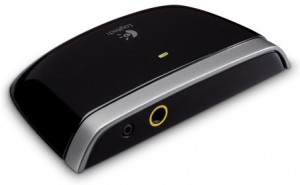
How does it work?
In short, the adapter takes an infrared (IR) signal from your Harmony remote, and then transmits a Bluetooth wireless signal that commands the PS3.
Can I use it to control other components that use Bluetooth wireless technology, such as the Wii game console?
No – in a nutshell, the adapter speaks a Bluetooth language using hardware and software that is specific to PS3, in the same way that Sony’s game controllers are specific to the PS3.
How is it powered?
The adapter runs off of an independent AC power plug (wall). We considered USB, but we didn’t want the adapter to use up one of your valuable USB ports. And if it did, you wouldn’t be able to power on the PS3. We also thought about using batteries, but we didn’t want to subject you to a frustrating troubleshooting exercise when it ran out of juice a year from now (I’d probably forget it had batteries by then). Once you plug it in, you won’t have to think about it anymore.
Which remotes will it work with?
Any Logitech Harmony remote. This adapter allows your Harmony remote to control the PS3 just as it would any other AV component (cable box, TV, DVR, etc.) in your entertainment system. You will have access to special commands we’ve created through your Harmony online account, including a power-off macro that allows you to turn off the PS3, along with your entire entertainment system, with a single button. It is NOT designed for use with other remote controls.
Why not make a remote with Bluetooth built in?
We’ve certainly looked into it – but we don’t want to make our existing Harmony users buy a new remote for PS3 control, nor do we want to restrict this control to a single Harmony model. With the adapter, you can use any Harmony remote you’d like.
Last, here’s a setup tip to keep in mind once you get the adapter and go to update your Harmony remote via your online account: If you’ve previously added a PS3 device to your account, remove it and then add it back as a new device. This will give you all the new codes and controls you need for the PS3. We’ve created what we believe is a good default button configuration for you. But if you’re like me, you’ll want to spend some time tweaking the buttons to perfectly suit your own tastes and your own unique setup. Then it’s off to the couch to enjoy your Blu-ray HD experience. Enjoy!
Related Reads:
- Logitech’s Harmony Adapter for PS3 arriving soon (CNET)
- Logitech Harmony Adapter for Playstation 3 — official, real, and in our hands (Engadget)
- Logitech Harmony PS3 Remote Adapter Review (Gizmodo)
- How To Use Your Universal Remote With Your PS3 (Kotaku)
Hi everyone,
Thanks all for your continued feedback.
We’ve been able to reproduce the issue that some of our customers have reported when using game controllers in combination with our Logitech Harmony Adapter for PS3. The issue exists in only the first batch of Harmony adapters we manufactured — the product that we’re currently producing works as expected.
The behavior is that the game controller loses its connection to or may fail to connect to the PS3 when the Logitech adapter is connected. These issues are most often seen with the new PS3 Slim, but we have also observed inconsistent behavior with the original PS3 and recent Sony firmware updates.
If you are experiencing similar behavior with your game controllers and our Harmony adapter, more information is available here.
Thanks for your patience, Troy


I have been looking forward to this gadget, when will it be available in EU?
Hi Johnny,
It will be available in Europe beginning in July for 59.99 euros.
-Troy
Awesome… July can’t come quick enought.
Hi there,
When will it be available in Switzerland and what will be the price?
Best regards and keep up the good work
Angel
can you play games with it too?
Hi Ben,
Like all remote controls for PS3, it won’t be recognized within games. However, when you’re not in a game, you have access to all the same controls as a standard PS3 game controller. With your Harmony remote and the adapter, you can navigate the system with ease, do things like scroll through and play music files and videos, and of course, control DVDs and Blu-ray movies.
-Troy
Where can I pre-order this?
Great. Just today i started looking after such a device. Point in time!
Awesome! Can’t wait to get this!
Logitech should make the IR command available for other Remotes as well. They would sell a whole lot more of them.
No RF? I have to attach one of the IR sensors from the extender to the front of this $60 device? I love Logitech and buy Logitech products whenever I have the chance because they are the best and they rarely do things halfarsed. I’m believing that no built-in RF and having taken so long to develop this device is one in that low-populated column.
Hi WhyNotV2,
There are a few ways to use the PS3 adapter with an RF Harmony remote. You could place the PS3 adapter within line of sight of the remote control – all the RF remote models also emit IR. Alternatively, you can place the PS3 adapter behind the RF extender’s IR emitter cable. OR, if you’d prefer, you can use a 2.5 mm to 3.5 mm cable (male to male) to connect a port on the PS3 adapter directly to your Harmony RF extender. You can find such a cable online or at your local electronics store.
-Troy
Looks like this adapter is up over at Amazon, and exclusive to them. At least right now…
Bestbuy’s website is saying available 5/27-6/9. Does that sound about right? I’m ready for this device as well! Been looking at purchasing a device like this for quite some time. Glad I haven’t yet, as I will for sure be getting Logitech’s! The $60 price tag doesn’t really bother me at all.
Why not sell this adapter AND release a harmony remote with bluetooth built-in as well? Then you won’t alienate current harmony users, while also presenting a better alternative to new users to harmony. I’ve wanted to buy a harmony 550 for a few months, but because my main media player at home is a PS3, I’ve been waiting for a better solution. Buying the same harmony 550 + this adapter is an option, but not the one I’ve been hoping for.
First Day Purchase, ’nuff said.
Seriously, thank you Logitech for finally coming out with this.
Interesting.. I presume, what with it shooting out bluetooth commands, this can sit on top of a credenza or closed entertainment cabinet and work properly like any other RF remote, even if my 880 is just IR?
Alternately, the Nyko IR USB dongle works great with Harmony but doesn’t have remote poweron or ‘Playstation’ button.
If this had come out 6 months ago, I’d have gotten it when I got my PS3, but maybe I’ll wait until xmas or birthday now..
I think WhyNotV2 is confused. They have also confused me on what the heck they are talking about. Plug in the AC adapter and pair it with the PS3 and you are good to go.
Purchased from Amazon, thanks Logitech! Keep up the good work!
I just ordered this from Amazon…. and it already shipped and has a delivery date of Thursday.
Hi all,
Quick update – as many of you have already figured out, you can order today (in U.S.) on some online sites, including our own.
-Troy
60 dollars in the US and then 60 euros in Europe??? At today’s rates 60 euros is MORE THAN 80 DOLLARS!!! Add in 25% Norwegian sales tax and we’re at 100 bucks. Approximately half the price I payed for my Harmony One which is just WAY too much.
This is a great product, but I’ll be fine with picking up my dualshock until the prices come down…
Thank you so much for creating this product. My order is already in.
Troy – Great product, happy to see it released. Here’s an unrelated question though – is there an RF-enabled version of the Harmony One coming any time soon? I have an 890 and it is absolute junk compared to the One, but due to my HT setup I need the RF abilities. I would eagerly jump on an RF-enabled One…
Hi Braden,
That\’s probably a better question for the Harmony team (I\’m in the gaming business unit), but as a rule, we can\’t reveal information about our future plans with regard to products. In any case, I\’ll forward your comment to the Harmony team.
-Troy
This is great! Would you mind providing a list of the pre-configured special commands that will be made available?
Hi Brian,
First, we\’ve created default button mapping, taking the standard 51 PS3 commands and applying them to the most appropriate hard and soft (LCD) buttons on the Harmony remotes. You just need to update your remote by adding the updated PS3 device to your online Harmony account. You may still want to tweak your own button configuration — and all of these commands can be assigned to any buttons you choose.
Above and beyond the standard commands, we\’ve added a PS3 power off macro command that allows Harmony users to turn the PS3 — and their entire entertainment system — off with a single touch. And one other little nugget — in addition to a PS button, we\’ve added a \”PS hold\” command because the system recognizes a difference between holding a PS button and tapping it. All of these commands can be assigned to any Harmony remote button.
-Troy
What are the voltage / power requirements? I’m curious because I would like to use my USB to power adapter instead of an actual power supply which would be coming from another component (either my A/V receiver, DirecTV receiver, or power conditioner) that supplies constant power whether its off or on.
Hi RobertV,
The power adapter we use is 5V/500mA. We investigated using a USB power solution, but opted against it beacuse if you use the PS3 as the power source you wouldn\’t be able to power on the PS3 with the remote and you would also tie up one of those precious USB ports that could otherwise be used for game controllers.
-Troy
As another European customer, charging €60 for a $60 product is nothing short of gouging – and as I’m in the UK will you also be charging £60 for this product ($92 equivalent)?
I really don’t know how you think you can justify charging over $20 more for the same product in Europe.
Sorry, but I’ll pass, thanks. Now, if you were charging a more realistic price of €45 to €50 (or £40 to £45) I’d bite your arm off, but don’t take the Michael out of us.
when is this released in Australia?
Indeed — am curious as well as to when this is coming out in AU. I checked the AU website and there’s no mention of it whatsoever. The blog made it sound like we’d get it before the States!! Was quite excited. 😀
Hi, does this unit do power sensing. I dont see a power sensing option on it, the new schmart adapter while 20 dollars more provides a usb power sensing cord.
This is for us with kids or who forget to turn it off and on and off with the remote, and things would get out of sync.
Would be interested if this unit has a power sensing cord, or any power sensing somehow implemented.
Hi OneTwo,
We don\’t include power sensing because the remote and adapter can turn the PS3 on and off — and yes, the commands are different for on and off. By default, your Harmony remote and adapter will turn the PS3 off when you power off your system (you can change this of course in your Harmony account). Your Harmony remote also keeps track of the state of your components, and you can always use the remote\’s Help button if any of your devices (including PS3) get out of sequence.
-Troy
OR just a follow up, maybe this unit does not need it? Are the off and on button different.
On the other units this occurred because pressing the ps button turned it on, and pressing the ps button also turned it off.
Yeah, good question, Shayno. And what’s the Australian price likely to be?
How are you doing On/Off? Is it through a macro or something? Or will it always work? I have an off sequence programmed in my Harmony via the IR2BT controller I have, but it sometimes doesn’t work.
Hi JakiChan,
Power off is a macro command and power on is the equivalent of tapping the PS button on a game controller.
-Troy
Any word on a date for Canadian availability? I’m looking forward to hurling the lousy non-backlit Sony blu-ray remote in the trash as soon as possible…
I think you missed a trick by not powering this device via a USB socket, you could have provided a power supply terminating in a USB plug and given users the choice of using either the provided wall-wart or an always-on USB port for power, seeing as USB ports are now common on AV kit (amps, set-top boxes etc.) which would very likely be in the vicinity of the PS3.
The power requirements for this device can be provided no problem by USB, and I find the decision not to support USB quite bizarre.
Here’s a novel idea…why not make both and give consumers the option? Existing Harmony users can buy this super expensive AC plug hogging $60 adapter OR buy a brand new bluetooth enabled remote. Everyone wins.
When will this be available in Australia? This blog suggests “any day” in Australia, yet US websites are already selling it before Australia, even though they were supposed to get it “in the next few weeks”.
I phoned Logitech Presales who directed me to Harmony Support, as they didn’t know about it. Harmony Support told me to call DSE and Harvey Norman. Both these stores do not have it in their systems, and neither do any Australian online stores.
If it’s going to be a few weeks, please let us know so I can stop chasing now and wait. Cheers.
I received the Harmony PS3 Adapter last night. It has a port to connect a cable to my RF Extender so you do not have to have line of sight to the PS3, at least, that’s how I understand it. I’m technically challenged.
What type cable do I use and where do I get it?
Brian
@Andrew, Spin, Albert, Geoffo and Shayno,
Quick update on availability. For our friends in Australia, it should start to to show up online in June. Pricing is $99 AUD. In Canada, it should start to be available online as early as next week!
-Troy
What are the 2 receptacles on the adapter for, where do they plug into the PS3?
Hi John,
The adapter connects wirelessly to the PS3 (via Bluetooth). One port is for the power supply. The other (optional use), as I mentioned in my post to WhyNotV2, can be used to connect the adapter to one of the Harmony RF extenders.
-Troy
How will the adapter handle PS3 firmware updates? I’m already reading that with the latest PS3 update, the adapter will not power on the PS3.
Hi Adam,
System updates for the PS3 won\’t affect the functionality of the adapter and Harmony remote.
-Troy
Hello tpetersen,
is the US-Adapter comapitble with the PAL-PS3 and also with Europe-Harmonys?
thx
I live in the UK and I’m visiting the US next week. If I pick one of these up will it work in the UK?
Hi John and LXD,
The U.S. adapter will work in the U.K. as long as you have an outlet converter.
-Troy
So no plans to ever make a bluetooth remote? I think the excuse is silly, it’s not like you’re never going to make another model with more features again. People don’t have to buy things, but this one-way adpater approach is just plain backwards. It’s overpriced and I certainly don’t want something else to plug in.
$60 USD? So far I’ve seen $71 CDN online.
My Sony BT remote cost $19 CDN. My Harmony remotes were both under $40 CDN.
Where’s the value?
I have 2 PS3s and only 1 Harmony remote for now. If i use the adapter, will it interfere with the other PS3, or is it “locked” to just one PS3. Also, If i purchase another remote and adapter for the other PS3, will that interfere with this one?
Hi Junior,
The Harmony Adapter for PS3 pairs directly with and remains paired to a single PS3 machine. If you have multiple PS3 machines, there is no issue with an adapter being confused because it is paired directly to one unit. If you had two PS3 machines in different rooms, you can control them separately. However, if you had two of the adapters within line of sight of a remote, the IR signals sent by the Harmony would be interepreted the same by both (the same way if you had to TVs with the same model in the same area).
-Troy
Ordered it from Amazon with Saturday delivery Friday, and have been giving it a workout today. Love it! Thanks so much Logitech – this is exactly what I have been missing. Setup was dead simple, and so far I haven’t had a single issue. Plus, it looks pretty good!
Will one of these[1] work with the Logitech Harmony Adapter for PS3, allowing power to be provided from an active USB socket?
1. http://tinyurl.com/r6kckj (Amazon)
Hi Charlie,
Unfortunately, I can\’t vouch for specific products unless we\’ve had a chance to test ourselves. I wouldn\’t recommend using a USB power source unless that device always remains on, otherwise the power on/off won\’t work correctly. That said, you would need to find a connector/plug with the following specs to connect to the Harmony Adapter for PS3:
3.5 mm outside diameter/1.1 mm inside diameter
7.5 mm length of the barrel.
+ is inside pin
– is outside contact
-Troy
Received my Logitech Harmony adapter for ps3 yesterday. It is very nice. But I seem to be having some issues with it. For instance, if I go an activity involving my PS3, do whatever i have to do in that activity, then power off the ps3, then go to say my “Watch TV” activity, then when i go to power down everything with the power button at the top(i have a harmony 880), the PS3 COMES BACK ON! Pretty frustrating. But really the only way I’ve found to be able to keep the PS3 off is if I go back to my “Watch TV” activity, then hit the devices button, then PS3, then the PowerOff command. Anything else I do, the PS3 just seems to want to stay on, or come back on.
Hi Chris,
I\’d recommend contacting our Harmony customer support to troubleshoot your setup. You can start at forums.logitech.com or http://www.logitech.com/support.
-Troy
Nice, but 60GBP is too expensive. I’ll stick with my Sony remote.
Okay, then how about this for weird behavior…. If I’m in a PS3 related activity, then power off, if I switch to “Watch TV” activity fast enough, the PS3 won’t come unexpectedly. But if I power off PS3, then let it sit there for a min, then go to my “Watch TV” activity, the PS3 will COME BACK ON. So frustrating, spent HOURS yesterday, trying to get it to act halfway right. I’m sure it’s something simple.
DON’T WASTE YOUR MONEY FOLKS!!!!!!!!!!!!!!!!!!!!!!
I have a Harmony and COUNTLESS other logitech products. I love these guys. But this new adapter is bloated hardware and at worst a bogus attempt to grab money. I’ve been using the Nyko Blu-Wave infrared remote USB receiver with my Harmony remote for a year now, and it works great, and I got it for $15 at Best Buy (unfortuntely, you have to be wasteful and throw away the Nyko remote…all you need is the USB receiver).
I have the Nyko USB receiver too and it works well enough with my 880, however there isn’t a power on/off feature. Given that I’m debating on purchasing this or not.
Thanks Troy for emailing my issues to support! I did in fact figure out my issues. Anybody that may be having similar problems, check out this forum thread:
http://forums.logitech.com/logitech/board/message?board.id=general_remotes&thread.id=29266&view=by_date_ascending&page=1
Love the Harmony Remote and this will finish off the puzzle for my AV equipment, but there is no announcement on when this will be available in Australia. Amazon.com will not ship the PS3 Adaptor to Australia because of a trading embargo placed on it by Logitec in the States. Feeling a bit left out here 🙁
Please provide Australian date asap
@Kevin and @Lee,
It should be available in Australia beginning the week of June 10.
-Troy
$60 is too high, I probably won’t buy unless it drops to about $20.
Enabling the Harmony adapter in the PS3, seems to disable the native PS3 remote, which stinks, as I like to use it in the the other room to control my PS3 (I have long HDMI on a switch run to another room). Any tips?
Hi Tom,
You can only connect one Bluetooth remote or remote adapter to the PS3 at a time. For your specific setup, you might consider one of Logitech\’s RF remotes, such as the Harmony 890 or Harmony 1100 (and additional RF wireless extender), which can give you an approximate range of 100 feet (varies when obstacles such as walls come into play). One of these remotes, in combination with the PS3 adapter, gives you the ability to control the PS3/adapter without a direct line of sight.
-Troy
Needs yet another power socket(not very green), not for me then. USB device powered by the PS3 was the way to go. Not wanting the adapter “the adapter to use up one of your valuable USB ports” is trite. Firstly there are 4 of them, secondly adding a usb hub is one of the easiest and cheapest way to add more usb ports.
Did you mean the week beginning 1 June for release in Australia?
Thanks
Jack
I agree that $60 (apparently $84 in Canada) is much too expensive for an adapter. I have two PS3’s (one of which I won), and such an expense would be excessive. Something in the $20 to $30 range would be way more acceptable.
If this is US$60 I’d hate to think how much it’s going to be in Australia. Such a shame, I’d get it otherwise. My other option was to get an infra red remote (with adapter) for the ps3 and then ‘teach’ the logitech remote the buttons.. saw one of them in BigW here for AU$60 I think.
@Gerry
Did you not read the article? It can’t use the USB ports on the PS3 because they do not deliver power when the PS3 is in standby mode. This would prevent you from switching the PS3 on with the Harmony remote.
Hi everyone,
I live in sweden (Europe) and just received my harmony 1100, I had a harmony 1000 before which worked fine with my PS3 using the logitech RF extender connected to IR2BT via usb. I cant get this to work and I have tried buying this new official ps3 harmony adapter but its not possible for me to order because Im in europe. This is very bad I think, does anyone know which site to order ot from that can deliver to europe?
I threw the old IR remote away since I only needed the adapter for it to work and now I cant transfer the IR codes because my old harmony 1000 is locked because I got the 1100 on warranty due to a faulty display.
my email is gallantrymike@hotmail.com.
I would appreciate any input
Best Regards
Michael
Hi Michael,
The Harmony Adapter for PLAYSTATION 3 should be available in Europe in early July.
-Troy
Finally after hunting so many rubishy blogs, I finally find the information I have been looking for, thanks!
Any news regarding release date in Denmark?
Hi Casper,
The adapter should be available in most parts of Europe — and Denmark — by mid-July.
Cheers,
Troy
Will the remote or the BT unit preform the Power Off Macro?
Where in Canada can I get this device?
Hi Freakhead,
It is now available in a number of Best Buy and Future Shop stores and should be available online at Logitech.com shortly.
-Troy
Ah, what irony.
Isn’t Logitech Swiss? And I’m *in* Switzerland, but I have to wait until July, sigh.
I have fought some battles with a Harmony 525 where the kit I have appears to be difficult to control (JVC DD3 for sound, a PS/3 playing BluRay and DVD, via optical link, and a Sony Bravia TV which appeared not so brilliantly supported) so I was about to give the thing to a friend. I may wait now, although buying a converter that costs almost as much as the remote control is something I have to think about..
Hello!
Really nice stuff! When do we get it in germany? When it’s available I’ll order it with a harmony!
Much greetings!
fabe
Hi Fabe,
It should be available in early July.
-Troy
This is good news! But it’s still not the “great” news I think a lot of people are waiting for!
1) Having an adapter is great for those that already have a harmony and want to add PS3 support, but (like me) if you are thinking about a new universal remote then I’d be a LOT more tempted by one that has the bluetooth support on-board, by the size and power needs of a GSM bluetooth headset, the extra hardware and power needs can’t be that impossible to overcome can they?
2) If a mobile phone and pda can pair itself with a variety of devices and speak a “Bluetooth language using hardware and software that is specific” then why can’t you download the specific codes for devices via the internet and pair them? Isn’t that exactly how you can auto setup a Harmony with IR codes?
I much prefer the tactile feeling of buttons on a remote rather than a touch-screen, but a PDA with IR and bluetooth support seems to be a more complete solution still, it should be pretty easy to add bluetooth support to gadgets like light switches and sockets (IR and RF ones have been around for ages) etc. why can’t someone make a simple remote to control them all? Or am I asking for too much!?
Cheers
Al
Why isn’t this adapter working with my Harmony 1000 LCD screen remote. I followed the instructions to a T. But everything I programmed in works EXCEPT the F”ing PS3?
It’s now early July, any specific release date for the u.k?? Love my Harmony One and want the adapter to complete the set up of my home cinema.
I too am waiting for news on the UK release. I got my Harmony One about a month ago and just need this gizmo to compete my setup.
Wish List: A Bluetooth based universal remote, then I don’t have to keep the thing pointed at the kit while it runs macros. Of course, there would have to be an IR repeater for most kit. You’d have though AV kit manufacturers would be adopting Bluetooth technology by now….
Also waiting for it to appear in the UK, disappointing that it wasn’t released in Europe first or at least at the same time as the US! Agree that a Bluetooth Harmony would be great!
Will the adapter work with the Monster AVL300 remote, which uses Logitech Harmony software but is not manufactured under the Logitech Harmony brand?
Hi!
When is this supposed to be available in Finland and where can I first purchase it?
Thanks,
Ville
hi.
is there a precise release date for the uk. if so when is it.
Paul, Pete, Mark and Graeme, the Harmony Adapter for PS3 is now available for purchase in the UK on Logitech.com.
Best, Troy
Ordered one from Logitech UK website on 13th still showing as no stock, when are we likely to see UK delivery?
Arrived yesterday, works a treat
when will it be available in Singapore?
Hi Kaya,
Unfortunately, we don\’t have any plans to release this product in Singapore.
-Troy
Troy,
Thanks for your reply even though it is a weird that no intention to release this product in Singapore when we consider you carry full range of remotes. I am a bit dissapointed to hear this, could you pls advise if it is available somewhere in Asia?
Hi Kaya,
It is available in Hong Kong (and Australia).
-Troy
I have a problem with my PS3 adapter. It keeps losing connection to the PS3. And when that happens, my PS3 gamepad loses connection too. I have to re-sync them back up. This has been happening 2-3 times per week for me and is unacceptable.
What is wrong with this device? Is there a firmware upgrade?
Hi,
same problem as John with my adapter.
It is really unacceptable. Why is there no answer from logitech support?
Was just going to order this but not if there is still an issue with unpairing. Has it been resolved or are you still having problems?
I’m having a similar problem to John & Matthias. The adapter works find sometime but other times it looses the ability to control the PS3. It won’t turn the PS3 on. And other times it will turn it on but then not control the PS3 and the wireless controllers can’t connect – they just flash. I have to hold the button on the PS3 to turn it off/on to get the controllers working again.
As stated, this problem is intermittent but frequent enough to be really annoying. I have a first gen PS3 (bought Nov ’06).
Please fix!
-Steve
Hi everyone,
We\’re currently testing game controllers and Bluetooth remotes with PS3 Slim and PS3 firmware 3.00, and finding some inconsistent behavior and interaction between the different devices. We\’re also in touch with Sony and will post more information about these issues and solutions as soon as we can.
For those who are experiencing problems, we very much appreciate your patience.
Best, Troy
My setup is with wireless extender, and the problem is when I push the activity button for a second time logitech 895 loose its connection with PS3 (60 GB, first generation), also the controllers loose connection.
(Sometimes you need to push the activity button twice since some components like tv or av receiver does not respond initially)
I need to reset the PS3 by AC switch at the back side to overcome this problem.
Although it is not a major problem for me, it should be fixed.. (but it is a major problem for my wife)
Hi.
I have a really a annoying issue with my PS3 harmony adapter.
The Setup.
Logitech Harmony 525 Remote
Logitech Harmony PS3 Adapter
Playstation 3 80Gb
Samsung PS42HQ7 (plasma)
In the configuration i have choosen Playstation 3 for the remote.
When ever i use my Logitech remote to controll the PS3, the “blue eye” on my tv reacts as if it´s picking up the transission sent to the PS3.
The PS3 however reacts on the command sent, but you can imagen how frustrating it is when you navigate in the menues and for every press on a button, you get the blue flash blink from the TV.
I have tried to play around with delays on the buttons wihtout results.
Any one else with the same issue?
Hi everyone,
Thanks all for your continued feedback.
We’ve been able to reproduce the issue that some of our customers have reported when using game controllers in combination with our Logitech Harmony Adapter for PS3. The issue exists in only the first batch of Harmony adapters we manufactured — the product that we’re currently producing works as expected.
The behavior is that the game controller loses its connection to or may fail to connect to the PS3 when the Logitech adapter is connected. These issues are most often seen with the new PS3 Slim, but we have also observed inconsistent behavior with the original PS3 and recent Sony firmware updates.
If you’re experiencing similar behavior with your game controllers and our Harmony adapter, more information is available here.
Thanks for your patience.
Troy
attn. Troy Petersen,
Could you please inform us which PID numbers are OK and which are not?
Thanks in advance,
R.C.
Attn.: Troy Petersen
We currently have 2 units with PID nr. LZ920BW, which units show the obove mentioned inconsistent behavior.
In addition we have 1 unit with PID nr. LZ39365 which unit does not show the above mentioned inconsistent behavior.
However, we observed the following inconsistent behavior;
when using a mainswitch to power the PS3 and the PS3 Adapter at the same time, the PS3 is switched on by the PS3 adapter without giving any command.
Please do not hesitate to contact me by email for any additional information.
R.C.
Hi Troy,
I am planning to get me one from Future Shop (Canada) this week, but I would like to avoid any trouble.
So it would be great if I knew beforehand what PID I don’t want to get, instead of needing to run into the problem / calling support?
Is there currenlty any way around it?
Do you know if all currently sold units should NOT have the bug?
Basically as R.C. was asking: Could you please inform us which PID numbers are OK and which are not?
Thanks,
JC
Attn.: Troy Petersen,
Hi Troy,
Look forward with interest to receive your reply.
Regards,
R.C.
Hi R.C.,
Please contact Logitech support – they’ll be able to assist you.
Best,
Troy
Will it ever be possible to use the harmony adaptor AND have two controllers connected? (Instead of just one controller…)
Hi Anders,
The PS3 can be connected to seven Bluetooth controllers at once, so the Harmony Adapter can be connected to the PS3 at the same time as up to six game controllers. The only limitation is that the PS3 can connect to only one Bluetooth remote at any time, so you wouldn’t be able to use both our Harmony Adapter and the Sony remote at the same time – but not sure why you’d want to do that anyway 🙂
I hope that answers your question.
Cheers,
Troy
Attn.: Mr. Troy Petersen
Subject: Logitech PS3 adapter
Dear Mr. Petersen,
We have one unit of a later production batch, which unit works as expected during operation.
However, we observed the following inconsistent behavior;
When using a “switched multi-way extension socket” to power on (amongst others) the PlayStation 3 as well as the Logitech PS3 adapter,
the PS3 adapter activates the PlayStation 3 without giving any command with the remote control.
We should be very pleased if you investigate this problem as well.
Thanks in advance for your well appreciated cooperation.
Look forward with interest to receive your well appreciated advice.
Regards,
R.C.
Thank you Troy, I discovered that my harmony adaptor was from “the first batch” of adaptors, and that is why I was having problems. Logitech told me that they will be replacing it soon. I was told that PID’s LZ922 and below were the ones affected.
First off, I use a logitech remote along with a wireless extender to control everything in my entertainment system. All my commands are routed through the wireless extender to free me of any line of sight issues. I recently acquire the PS3 adapter, but I am having issues configuring the activity using to transmit through my wireless extender and in turn transmitting to the PS3 adapter. I am missing all the simple commands under activity, but if I go to devices the controls are available to pause/FF/REW/Play, etc.
I would like to continue to control everything through my wireless extender, and not have to toggle between device and activity to play (Device) and adjust the volume (Activity). Does anyone know a resolution to this issue?
Hi Edman,
Please contact customer support at http://www.logitech.com/support.
Cheers,
Troy
Dear Mr. Petersen,
We recently received a number of PS3 adapters with PID: LZ93775.
During testing they still show the inconsistent behavior as described in my message of October 11 last.
Again, I should very much appreciate an answer as to my message of October 11 last.
Regards,
R.C.
Hi Troy,
Just wondering what the additional port on the back of the Harmony adaptor is for? It looks suspiciously like it should be able to be accept an IR blaster… It doesn’t happen to repeat all IR codes out that port, does it? Is there any way of perhaps upgrading the software to allow that operation, it would be extremely useful to have the Harmony adaptor being the only component outside my AV cabinet.
Kind regards,
Nicholas Reid
Hi Nicholas,
The Adapter for PS3 is not an IR blaster. The adapter’s additional 2.5 mm port allows you to use a cable to directly connect it to a Harmony RF receiver (such as included in the new Harmony 900) or Harmony IR extender. With this hard-wire connection, you could hide the Adapter for PS3 anywhere in your entertainment cabinet and not worry about a line-of-sight from your IR remote.
Best,
Troy